Showing posts with label help in hand. Show all posts

Removing ink stains from your hands!


Because  i am an angel i will let you in on a secret,

You will want to know this secret because, i can guarantee you have had this problem before and will probably be having it again.
Ink stains, on your hands.

Sometimes i must admit, it looks good, like a cute temporary tattoo.
But other times, well babe, your pen has leaked and you have black fingers for a week at it's worst.
You want to wear a pretty ring you just bought, but you better save it for a another time. Why?
You know what it is. The dreaded ink stains.

duhhh duhhh dunnnnnnnnn

not cool

but ehhh it is okay for us, because all you have to do is..
You can use a hand sanitizer gel, which usually works for fresh stains (not quite stains anymore pha) ;)
I use the bath and body works one, though my kind friend Lucy brought it over from america, as yes, i am british- and proud.
The sanitizer is sparkly with different colour glitter bits. And it is in a cute little bottle, looking like something out of Alice in wonderland that says drink me. BEWARE though do not drink the liquid...
My friend has the the vanilla cupcake scented one and i must say even though mine smells of oranges and watermelon hers smells AMAZING.
If you are from England like me, you can get it off of amazon. Like i will when it runs out. It will.

It should go purple but then you rub your hands together and it just rubs away like magic!
Or if you are trying to break the world record for longest time without hygienically cleaning your hands, grab a lemon.
No not me.
A lemon fruit. Cut it in half then rub the cut side onto your inky skin, wash with soap, at the moment i am truly in love with the original source 'vanilla milk and raspberry' handwash.
Omg just smell it if you get the chance, it is quite sweet but heavenly and scrumptious.
This is the shower gel formula
which i need 
lush
and that is all :)

BYE

how to jazz up that teeny tiny picture...part 2

Part 2!

Now you have your cute favicon that you created from part 1 you can add it to your actual blog!

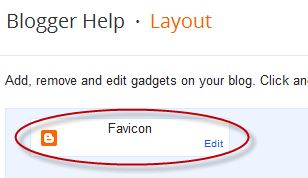
Firstly, you want to go into your blogger dashboard, then your layout then click on the edit bit of your favicon button which looks like this...


Now - once on edit, you can clickety click on the browse button!
Find your ready made favicon, it should be in your downloads file because you downloaded it dude! And it should have .ico on the end :)

After you accomplished that you can go ahead and open it!

The icon takes a little while to actually change but once it has, i am certain it will look beautiful! :)

Tadaaa
 I hope you do change it because it is great to add your own little touch to things, after all we are all unique and i like to explore other people's choices because it's interesting.
Have a lovely evening! Mwa x

how to jazz up that teeny picture...part 1

Favicons!

ohhhhh i love them! I didn't have a gollapogloop what the hell they were before but now i am full speed ahead and as you can tell i have a sexy little picture (really little!) right up there in the top left corner of your screen...if you don't have many tabs up that is.

What is a favicon?
i hear you say...

Well guys a 'favicon' is a swanky word for that cute little picture next to (at the moment) 'Claudia' which is (not only) my website name (but my actual name) that shows up on the tab, a.k.a right at the top of your computer above your address bar.

If you have a blog on blogger and have not changed your favicon then dude it will look like this...

But mine looks like this...

   yep it's pandadorable! ;)
But it may not even be showing yet cause babe i only just put it on there and these things take a while.


And here is how i made it!

okay so first i want you to find the perfect picture! I suggest going on weheartit because that is where i found mine :)

Next you need to go onto a favicon generator website. I went on this which you can also edit to your picture.

After opening that up, open your picture up!
Click on import image...
And then upload image... You want to change keep dimensions to shrink to square icon.

Then find your photo and click open!

Dont panic!!!

dude it will become fuzzy and you won't hardly be able to recognise it but chill it is just getting up close and personal with your picture, magnifying it.

You can edit the colours of the squares to change your picture which means if you like you can just blank it all out and create a letter or like a logo to your website, however i wanted to keep mine pandadorable with my lovey dovey panda bears. k.

So when your done or if like me you didn't edit it then click download BUT ATTENTION

Do not click on the large download signs all around the site. Dude they are ADVERTS to TRICK you!!!!!
So click on the download which is the smaller one 'download icon' under 'preview' which also if your stuck finding it got a small picture of your own custom made favicon on a tab bar!

And walahh it shoould go into your download file with .ico on the end!

The second part to my 'how to jazz up that teeny picture ...' will be on here shortly!

Got any questions? comment!
Want me to check out your blog? comment!
Think my favicon is pandadorable? comment!
Anything to do with my blog? comment!

euggh guys just comment okay!

thanks my little bubblegums :)
x mwa